Unmatched Filter
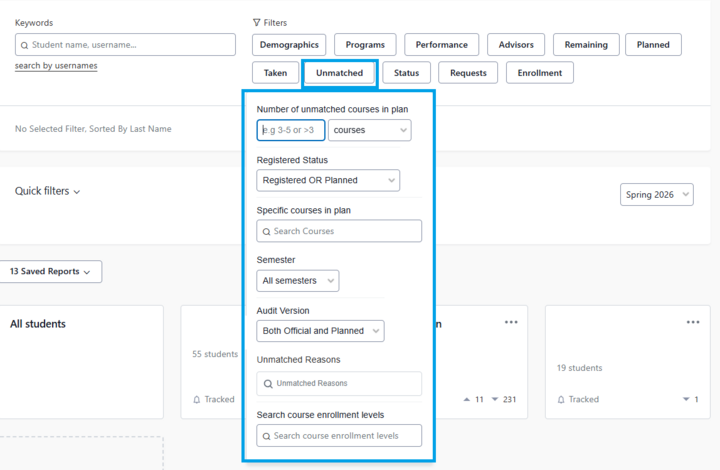
Advisors can identify courses that a student has attempted that do not satisfy any degree requirements. The fields include:
- Number of unmatched courses (or credits) in plan: courses or credits not applicable to degree requirements
- Registered status: filters for unmatched courses that are registered, planned, or both
- Specific courses in plan: search for one or more specific unmatched courses
- Semester: search for unmatched courses in a current or past semester, or all past
- Audit version: search for unmatched courses in official or planned audits, or both
- Unmatched reasons: filter for the reason the course is unmatched
- Search course enrollment level: filter for unmatched courses that are Graduate, Undergraduate, Law or Architecture
Unmatched Reasons
- Audit Grade Option: Course grade of AUD for a course because they audited the course and did not take it for credit.
- Plancourse Pass Fail Grade Option: This filter doesn't apply at UNL.
- Taken Without Grade: Grade is blank after grading period. This does not include No Grade and No Record (NR) grades which count as a grades in Stellic.
- Grade Does Not Apply: Course grade does not satisfy any degree requirement
- Course is Antireq: Course is in Unmatched because the student has taken its antirequisite
- Repeated Course: Course is in Unmatched because the student has repeated the course
- Course is Withdrawn: Course is in Unmatched because the student earned a grade of W