Courses with variable credit can be edited through the section editor window in CLSS, as long as it is not during a limited changes phase for the term.
Variable Credits are listed as a range automatically, as shown below, based off the approved curriculum. *Please note that new changes in curriculum are not instantly loaded into CLSS.* Curriculum can be viewed at https://nextcatalog.unl.edu/courseadmin/.

Going from variable to fixed credit:
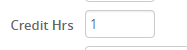
To change to a fixed credit, rather than variable, choose a number from the range and place it in both boxes.

After you tab over, the second box will disappear and the fixed credit number will be displayed.
Once this has been done, click Save Section and initiate the workflow.
Going from fixed credit to variable credit range:
To change credit hours to have a range, simply put a dash after the lowest desired credit limit to the highest desired limit. Note that it must be the range approved through curriculum.*
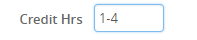
The second credit hours box will then reappear and the variable credit range will be displayed in two boxes.

Once this has been done, click Save Section and initiate the workflow.